

The 9-box grid has long been a staple of HR departments, but its true power lies far beyond a once-a-year plotting exercise. When used correctly, it serves as a dynamic map that aligns an individual’s current contributions with their future trajectory, so that every coaching conversation, training investment, and promotion is backed by clear, objective logic.
This definitive guide moves past the basic mechanics of the grid to explore how it functions as a catalyst for growth, equity, and long-term succession planning. Whether you are looking to identify your next generation of leaders, provide a roadmap for your technical experts, or bridge the gap between “meeting expectations” and “exceeding” them, mastering the 9-box method is important. We will dive into how to interpret the results, how to use the grid to personalize employee development, and how to make sure the process remains a fair and inclusive driver of excellence for your entire workforce.
Key Takeaways
- The 9-box grid can align an individual’s current contributions with their future career path, helping both individuals and companies plan ahead and succeed.
- The 9-box grid is a performance matrix that provides a visual framework for evaluating employee and team skills and evolution.
- You can create one by reviewing the employee’s job description, assessing their performance, assessing their potential, and then looking for overlaps on the grid.
- Interpreting a 9-box grid involves looking at the intersection of two specific data points: current performance (the horizontal axis) and future potential (the vertical axis). This allows you to identify high performers, low performers, and everyone in between.
- In modern continuous performance management, the 9 box grid can accomplish five things: help you define clear development objectives (and create a PDP); standardize managerial expectations (compare results across departments); justify resource and budget allocation (use it to allocate bonuses and make salary decisions); personalize coaching conversations (use it to create different meeting agendas); plan for the future of the organization (map out the future of the team and key talent).
- There are pros and cons to using a 9-box grid: managers should be familiar with these before using them to make important decisions. They should also use the 9-box grid wisely to make the process as effective and efficient as possible.
- Primalogik’s performance management software supports all types of assessments, including the 9-box grid.
Table of Contents
2. How to Complete a 9 Box Grid in 4 Steps
3. How to Interpret a 9 Box Grid
4. Bonus: Interpreting the Diagonal of a 9-Box Grid
5. The Role of a 9 Box Grid in Modern Performance Management
6. Pro’s and Con’s of Using a 9-Box Grid
7. Top 6 Tips for Using a 9 Box Grid Wisely
8. Primalogik’s Performance Management Software Supports All Types of Assessments
9. FAQs on the 9-Box Talent Review
What Is a 9 Box Grid?
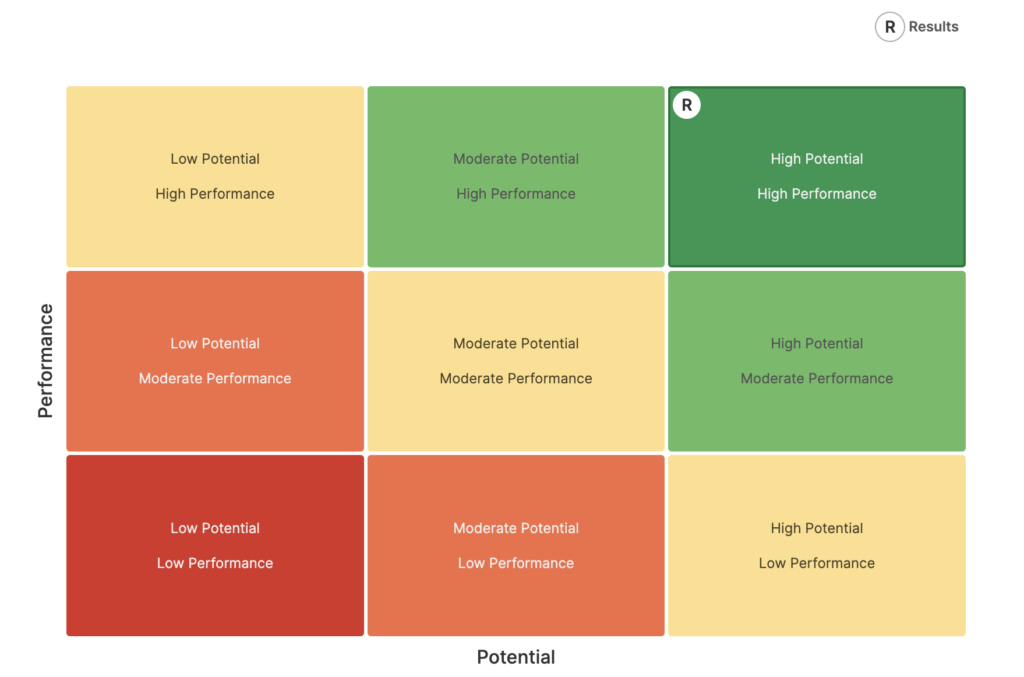
The 9-box grid is a type of performance matrix that provides a visual framework for evaluating an organization’s talent.
It has an X axis for performance and a Y axis for potential. Each employee is assigned to a cell in the grid matrix based on where they fall within each axis.
Each cell should contain a concise but detailed description of an employee at that juncture of performance and potential. Instead of generic labels like “future leader,” use clear terms that will really communicate what you have observed, so that it is easy to interpret.
By mapping an employee’s current performance against their future potential, you can evaluate their performance and act accordingly. It can help you make decisions on promotions or identify underperforming employees who may need a new type of support.
A color-coded heatmap makes the visualization even easier to interpret.
How to Complete a 9 Box Grid in 4 Steps
You don’t need to create the 9 box grid from scratch, unless you want to. Instead, you can download our free 9-box grid template and modify it to suit your specific needs.
To complete a 9 box grid, it’s best to follow a step-by-step process:
Step One: Review the Employee’s Job Description
Ratings should never be arbitrary. It’s important to stay focused on what the employee’s job description identifies as their key responsibilities. Have a printed or digital copy of these descriptions in front of you for easy reference. Dedicated performance management software can help you organize and easily access relevant notes and information for one-on-ones and other reviews.
Step Two: Assess the Employee’s Performance
Assessing the persons’ level of performance within the context of continuous performance management means referring to multiple sources of feedback, including annual reviews, one-on-one’s, instant feedback and tracked goals.
How well are they meeting or surpassing specific expectations for their role? Are they meeting KPIs? Using performance tracking software will help you reach objective conclusions because it allows you to access and visualize data on one secure platform.
An assessment like this usually results in a broad performance score of “low,” “medium,” or “high.”
Step Three: Assess Their Future Potential
There are several things to look at when you assess an employee’s potential. Have they been investing in their own development? Have you been able to track legitimate progress by measuring performance management metrics? Do they display the soft skills and/or technical skills needed to advance in their role or in your organization?
An assessment like this usually results in a generic “low,” “medium,” or “high” potential rating.
Step Four: Look for Overlaps on the Grid
Find where performance and potential overlap on the 9-box grid. This is the block that best describes the employee’s performance, both present and future.
In addition to offering a final numerical rating, you’ll also need to add notes about what you have learned, and explain your final rating to the employee, managers and HR in a way that is easy to understand.
People operations are becoming less about evaluating performance in a rigid, numbers-based manner, and more about assessing employees with the goal of retention and development. For this reason, offering an employee a number could be seen as providing a cold label. In today’s people-first workplace cultures, it’s more helpful to provide feedback and explanations of your findings.
The 9-box grid is meant to provide perspective, so that you can clearly explain where an employee stands, and not a judgement.
How to Interpret a 9 Box Grid
Interpreting a 9-box grid requires looking at the intersection of two specific data points: current performance (the horizontal axis) and future potential (the vertical axis). Rather than just seeing nine separate boxes, it is more helpful to interpret the grid by looking at the zones that indicate how much support an employee needs.
To interpret this grid effectively, you should look at it in three distinct clusters based on the level of investment the employee requires.
1. The High-Value Cluster
These employees represent your highest-value talent. They are either delivering at a high level today, show strong future potential, or both:
- The Star (High Performance / High Potential): This is your top priority for succession planning. They have mastered their role and are ready for a promotion.
- The Emerging Leader (Moderate Performance / High Potential): They show clear leadership capability but are still developing in their current role. They benefit from mentoring, stretch assignments, and experience to help translate their potential into stronger performance.
- The Top Performer (High Performance / Moderate Potential): They are performing at a high level but may still be developing some of the leadership capabilities required for more senior roles. They benefit from mentoring and expanded responsibilities to help determine whether they can grow into higher potential over time.
2. The Development Cluster
These employees are in the ‘effective’ or middle-tier range. They are doing their jobs well, but their next step depends on the right interpretation and support:
- The Blocked Talent (Low Performance / High Potential): They have High potential but low performance. This is one of the most difficult profiles to interpret. ou must find the roadblock: is it a lack of tools, a personality clash, or insufficient training?
- Core Talent (Moderate Performance / Moderate Potential): This is the backbone of your team. They consistently meet expectations and contribute to team stability. They can benefit from steady stretch goals to see whether they can move into higher performance or higher potential categories.
- The Expert (High Performance / Low Potential): They are excellent at their job but are unlikely to grow beyond their current role. They are well suited to their position, and development should focus on deepening expertise rather than moving into management.
3. The Risk & Reassignment Cluster
These employees are at greater risk of stagnation or misalignment. When interpreting these, always try to understand why these employees are struggling:
- The Reliable Contributor (Moderate Performance / Low Potential): They perform their role reliably but are unlikely to expand significantly beyond their current responsibilities. Interpret this as an employee who is well placed in their role. They don’t necessarily need a promotion, but recognition and continued skill development can help keep them engaged.
- The Underperformer (Low Performance / Moderate Potential): They have moderate potential, so don’t give up on them yet. Interpret this as a need for a structured, short-term Performance Improvement Plan (PIP) with targeted support and clear expectations.
- The Critical Risk (Low Performance / Low Potential): This is the only profile where discharge or demotion may become the primary interpretation. It signals a misalignment between the person and the organization’s needs.
Bonus: Interpreting the Diagonal of a 9-Box Grid
A 9 Box Grid can also be looked at as a whole to gain more insights. The diagonal from the bottom-left to the top-right represents the path of standard career growth. You can use this diagonal as a reference to see how an employee may be ready or capable of moving forward in their career.
Here are three examples:
- Employees in the top right could be seen to have outgrown their current role. They are high performers who need high-visibility projects and a clear succession plan because they are ready for leadership now.
- Employees in the middle are reliable and meeting expectations, but they need steady development to keep them from stagnating.
- Employees in the bottom left have either just begun or have reached their potential. They could benefit from technical rewards rather than pushing them toward a promotion they may not want.
The Role of a 9 Box Grid in Modern Performance Management

Integrating a 9-box grid into your performance management strategy provides a visual logic that connects high-level talent assessment with practical, day-to-day management activities.
Here are five key ways the grid supports performance management, with ways to put them into action:
1. Defining Clear Development Objectives
The 9-box grid identifies exactly what needs to be developed. Instead of a vague goal like improve skills, the grid tells you if an employee needs to improve their current output (moving left to right) or their leadership capacity (moving bottom to top).
Put it into Action
You can use the specific box placement to populate a Personal Development Plan (PDP), according to where they are in the grid.
2. Standardizing Managerial Expectations
One of the hardest parts of performance management is making sure that different managers use the same performance standards. The 9-box grid provides a shared language for what each type of performer looks like.
Put it into Action
HR teams use the grid during calibration sessions to compare rankings across departments, which helps reduce favoritism and bias.
3. Justifying Resource and Budget Allocation
Performance management isn’t just about coaching; it’s about where the company spends its money. The grid provides a data-backed reason for why certain employees may receive more investment than others.
Put it into Action
HR often maps 9-box results directly to salary increase or bonus templates. While some performance management tools, such as the 360 degree feedback, should never be used to influence compensation, a 9-box Grid can be used as a general guide when making salary and bonus decisions.
4. Personalizing Coaching Conversations
A 9-box grid can help managers stay focused during one-on-ones. It can move the conversation from generic questions to a more direct, Here-is-how-we-get-you-to-the-next-level type approach.
Put it into Action
Managers can even create different meeting agendas based on grid results. For someone in the ‘risk’ zone, the template can focus on strict accountability; for a ‘future star’ the template can focus on brainstorming and long-term career pathing.
5. Planning for the Future of the Organization
By visualizing the entire team on one grid, leadership can see if they are actually managing for the future or just surviving the present. It highlights areas where a team is overly dependent on one person.
Put it into Action
In this way, it helps managers develop a succession map. It allows you to identify who is ready to move forward now, and who is on their way, so you can build a continuous pipeline of talent.
Pro’s and Con’s of Using a 9-Box Grid
The 9 box grid is useful when used correctly for both traditional and continuous performance management approaches, but can cause problems if not. Let’s take a look at a few key advantages and potential pitfalls.
Advantages of Using a 9 Box Grid
Here is a breakdown of the key benefits:
- Allows for standardized assessments
- Offers perspective, as it examines the past and potential future of an employee
- Increases transparency between managers and HR, who can use performance data to audit evaluations for fairness and consistency across the entire organization.
- Helps make strategic talent decisions
- Provides simplified data visualization for a quick but comprehensive understanding of talent.
- Reduces bias when used with a clearly defined set of standards.
Possible Pitfalls of Using a 9 Box Grid
And here is a quick look at potential disadvantages:
- Placing an employee in the wrong box can have serious consequences—for the organization and for their career.
- It’s important to see low performers as having potential, and not write them off.
- Manager bias can still play a role if the grid is not used in alliance with strict performance standards and job criteria. The grid can be somewhat subjective when used by itself.
- Like any tool, the 9-box talent review can’t compensate for poor management or deep biases. HR should regularly review managers’ performance to verify that everyone receives equal, fair, unbiased treatment.
Top 6 Tips for Using a 9 Box Grid Wisely

Don’t let the 9 box grid dictate whether you invest in an employee. Unless you need to let an employee go, spend time developing them. Training and mentoring shouldn’t just be for star employees, but for everyone. The 9 box grid should just influence how you develop them.
1. Design a Rubric
Establish clear metrics for each box of the 9-box grid. These standards will create a consistent way to evaluate employees, promoting fairness. A clear narrative description for each point on the grid will also serve as a template for writing your 9-box review for each employee.
2. Complete Individual 9-Box Talent Reviews
Managers can complete a 9-box talent review before each performance review. When using this tool across review cycles, they can also look at patterns.
Individual 9 box grids allow managers to see whether moderate performers have become lower performers, or vice versa, and to consider what has influenced this shift, and respond accordingly.
3. Draw from other Performance Management Data
It’s a good idea to refer to other performance management data when completing the 9-box review. Encourage managers to look at progress toward goals, reflecting on objectives and key results (OKRs). Performance management software helps you organize and visualize solid analytics to draw from. Look at hard data like sales completed, leads generated, and project outcomes for a grounded assessment.
4. Write a Brief Description
Using your 9-box grid template, write a succinct summary of where a given employee stands. Refer to the standards for the box that best fits this employee. Then personalize the description to reflect their performance and potential. This makes it even easier to interpret the results of the analysis and refer to it in the future.
5. Assess Team Capabilities
To inform talent development decisions, some managers then arrange all of their employees into a single 9-box grid to make a full team assessment. This provides a bird’s eye view of what type of development their team needs as a whole.
This is done strictly for the manager’s use and shouldn’t be presented to employees. The manager can also use it for a self-evaluation over the longer term, by observing whether the majority of employees they manage make progress toward high and moderate squares.
6. Share 9-Box Talent Review Results
You can use the 9-box review results to inform a performance evaluation conversation. You don’t necessarily need to share the grid itself (and should never share the results publicly or with the rest of the team). Just use the results as a guide during your next annual review.
If an employee is falling short of expectations, emphasize that you believe in their ability to improve. You could refer to the core strengths that demonstrate their capabilities. Be empathetic if the employee feels surprised by your evaluation of their performance. Always focus on creating a pathway forward, not dwelling on undesired results.
Primalogik’s Performance Management Software Supports All Types of Assessments
Primalogik’s performance management software makes it easy to collect all kinds of performance management data and create practical visualizations and reports.
Use it to create custom questionnaires for 360 degree reviews to investigate how an employee’s performance is perceived by their peers, or track goals for accurate and fair performance evaluations. Check your notes in your manager journal to remind yourself what you learned about each employee in their last evaluation, and to remember important successes (or failures) when filling out a 9 box grid.
We believe that happy employees make for successful companies, regardless of whether you are a startup, small business or mid-sized company. Our award-winning software is proven to be easy to use and even easier to set up. Book a free demo today!
FAQs on the 9-Box Talent Review
1. Does the 9-box grid need to have 9 boxes?
The grid should have an equal number of vertical and horizontal columns. A 9-box grid is simple and approachable, while a grid with numerous columns could become unwieldy. But it is possible to add an extra column or two on each axis if you’d like.
2. Does a 9-box talent review really provide an objective look at performance?
The process is still somewhat subjective, but so is every performance review. This tool enhances objectivity by relying on concrete data and well-defined standards. While no performance review method is flawless, this enhances the objectivity of the process.
For a more comprehensive approach, use other forms of evaluation as well, like 360 degree reviews, which provide feedback from a range of colleagues. Leveraging multiple talent management tools will give you the best available data to inform your personnel development processes.